The problem
Most spreadsheet errors are invisible. A number stored as text drops out of a total. A date typed as "03/04/2025" won't sort. "North West", "north west" and "North-West" count as three regions. A stray space at the end of a heading breaks a lookup. A repeated ID makes VLOOKUP return the wrong row. Nobody notices until the figures are already in a report.
Cleaning up by hand is slow and risky, and most clean-up tools rewrite the whole file, so formatting, formulas and hidden sheets don't always survive.
The approach
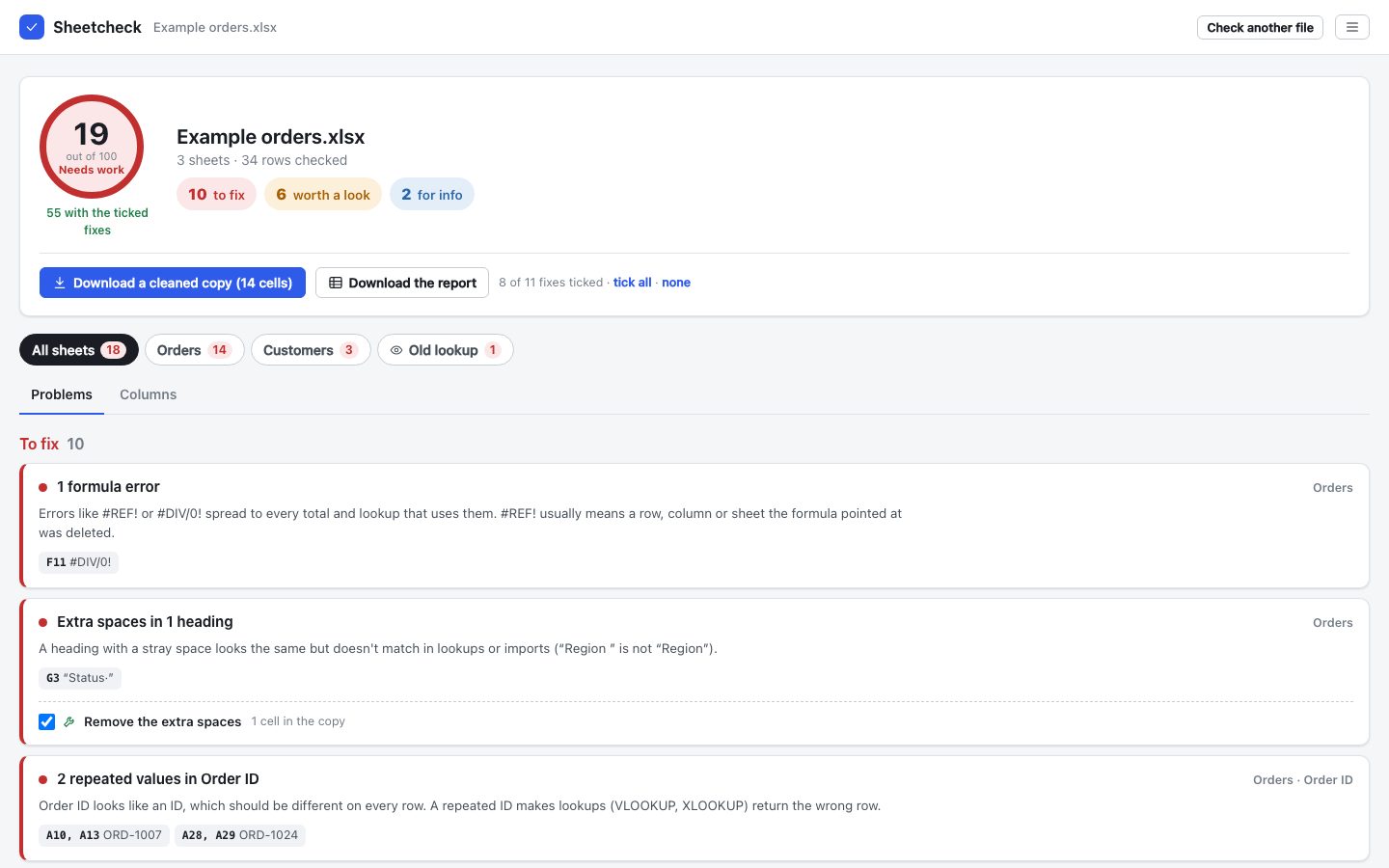
Sheetcheck reads each sheet as a table, checks every column and sorts what it finds into three groups: To fix (things that give wrong totals, lookups or filters), Worth a look (probably wrong, but only the owner can tell) and For info. Each problem says why it matters and which cells it's in. The workbook gets a score out of 100, plus what the score would be after the ticked fixes.
Fixes are opt-in ticks. The cleaned copy is the original file with only the fixed cells changed. Every other part of the file is copied as it was, byte for byte.
The workbook
Sheetcheck opens other people's workbooks, so it's careful about what it writes. The cleaned copy keeps the formatting, formulas, other sheets, hidden sheets and merged cells. It adds one tab, Sheetcheck changes, which lists every changed cell with its value before and after, so every fix can be checked.
| Sheet | Cell | Before | After | Fix | |
|---|---|---|---|---|---|
| 2 | Orders | E7 | 1,250 | 1250 | Number stored as text |
| 3 | Orders | B9 | 03/04/2025 | 2025-04-03 | Date stored as text |
| 4 | Orders | D12 | north west | North West | One value written several ways |
What it checks
- To fix: formula errors (#REF!, #DIV/0!), repeated values in an ID column, numbers and dates stored as text, dates showing as plain numbers, one value written several ways, and extra spaces in cells and headings.
- Worth a look: values that may be the same (an abbreviation, a different ending, a likely typo), duplicate rows, words like "TBC" in a number or date column, unexpected blanks, placeholders such as n/a, merged cells, and missing or repeated headings.
- For info: hidden sheets, rows and columns, and empty rows inside a table.
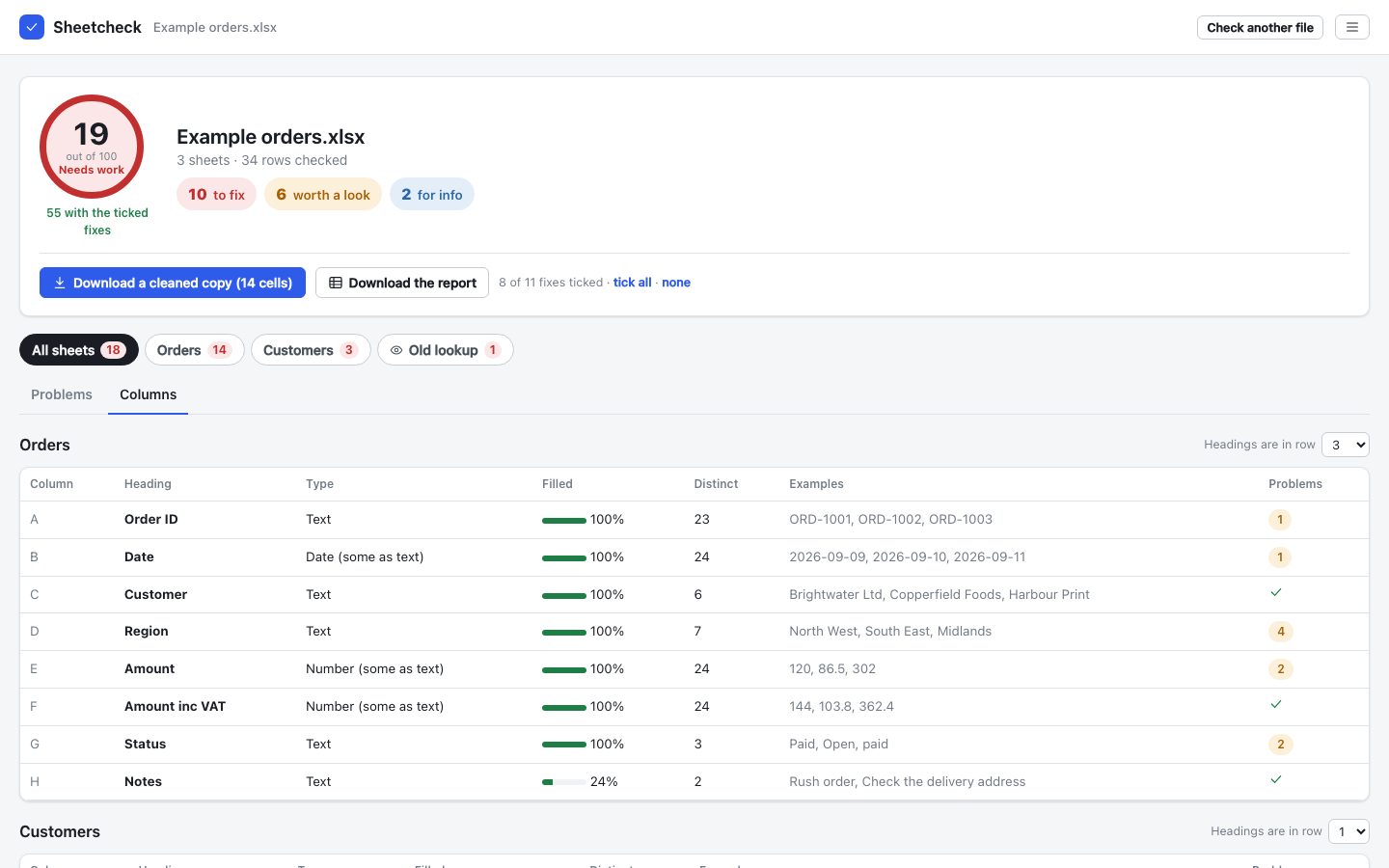
- A profile of every column: its type, how full it is, how many distinct values it has and some examples. The full report downloads as a workbook to share or work through.
Careful by design
- Read only. It never writes to the file it opened. The cleaned copy and the report are new downloads.
- Formulas are never changed. Values with a leading zero (phone numbers, account codes) and columns that look like codes stay as text.
- Guesses are never ticked for you. "May be the same" needs a person to decide, and codes that differ only by a number (STO06 and STO16) are always treated as different.
- Nothing is moved. Anything that would delete or move rows or columns, such as duplicate rows, is reported for the owner to do.
On your own computer
Sheetcheck is there to make the job easier, not to add another system to look after. Open it on this site, or download the zip, unzip it and open the file in your browser. Either way, your workbook stays on your computer.
That makes it a fit for organisations that are strict about who owns the data and what gets bought. There's no contract to sign, no new system to bring through procurement and no outside service holding the data. It works with the PC, the browser and the files people already have, inside the rules as they stand.
- Works offline. It never loads anything from the web, so it needs no internet connection.
- Nothing to install: no installer and no admin rights, so there's no wait for IT to approve new software on a locked-down PC.
- No licences or accounts: nothing to buy, no subscription and no sign-in.
- Excel not required. It reads and writes .xlsx files itself, and the workbook still opens in Excel for anyone who has it.
- Which browser: it works in Chrome, Edge, Safari and Firefox, and it never changes the original file: the cleaned copy is a new file.
Where AI fits
I designed and specified Sheetcheck and built it with an AI pair-programmer. Its tests drive the real page in a headless browser against an invented messy workbook, a workbook made by another program and a CSV. Then they open every cleaned copy in a separate spreadsheet library to prove the fixes landed and the formatting, formulas and hidden sheets survived.